Sunday, 19 April 2015

How to Track Your Facebook Login Location – Security Tip:


The Facebook security is very crucial for users as they do care different kind of confidential information on their accounts. Additionally, the hackers are very active nowadays in hacking the Facebook accounts. So, it is important for you to keep any eye on your account’s security.

Therefore, today I am sharing an one of the most important practice which will help you to keep an eye on your accounts login locations. Yes, I’ve said login locations. Today you guys are going to learn that, “How to track your Facebook login location?”


This is the latest feature of Facebook in which it gives the complete detail of login location, Operating System and Device type. It can help you to see that where your account is being logged in which will ultimately help you to take initial steps for the security of your Facebook account.


Learn-How to Track Facebook Login Location


So, here are the steps which you need to apply in order to track the Facebook login location. This is the official feature and you’ll not be needed any third party app for making it work for you. Now, without taking your time more I would ask you to get towards the below piece of writing.

  • First of all, login to your Facebook account and then Click on Down arrow.
  • Afterwards, from drop-down menu Click on Settings.
  • Now, Click on Security from left menu and then Click on Edit in front of Where You’re Logged in.
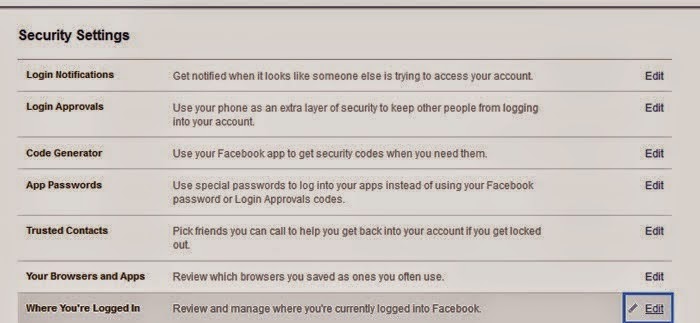
Then you will see all your recent login locations along with Device type. This can help you to check that from where your account is being logged in. This can really help you to take initial step if you have recorded any suspicious login.

Conclusion


This was our guide to track Facebook login location of your Account. I am sure that this article would have been proven helpful for many of the users out there. If you have any kind of question or confusions left related to this article then do let me know. I shall get back to your queries soon. Additionally, if you have found this guide helpful and worth reading then do share it with your other friends and circle too. You may never know that your share may be proven helpful for many of the users out there. So, keep sharing and keep helping your friends.


How to Hack(Access) Someone Else's WhatsApp Account


Accessing someone else's WhatsApp account sounds interesting. Not in all cases, but in some cases, people want to hack their partners, friends or any others WhatsApp account for fun only. But the question is how to hack someones whatsapp messenger? And your answer is very easy in just a few steps away. So for knowing the method of accessing (hacking) of another WhatsApp of your known one, just follow the below steps.

{You can also Comment from Facebook now, Just click on facebook comments at the end of the post}


Method. 1 By Using Target's Phone


Step. 1
  First of all, completely uninstall WhatsApp from your phone.

Step. 2  Obtain someone else's phone which you want to access.

Step. 3  And find the MAC address of that phone. It'll be in six pairs like-  01:43:65:87:98:cb


For Android, go to Settings - About phone - Status - WI-Fi MAC address.
For iPhone, go to Settings - General - About - WI-Fi Address.
For Windows phone, find this in Settings - About - More info - MAC address.
For BlackBerry, go to Options - Device - Device and Status info - WLAN MAC.

Step. 4  Now find your MAC address also and save both MAC addresses at any safe place.

Step. 5   Another step is install MAC spoofing apps for changing the MAC address of your phone. For iPhones install MacDaddy X or WifiSpoof. And for Android you can install some free apps like BusyBox and Terminal Emulator, which are available on google play store.

Step. 6   Now open app, in the terminal, type "ip link show" to see a list of interfaces. Identify the one that has your MAC address -- for this example, we'll use the eth0 interface. In the terminal emulator, enter "IP link set eth0 address XX:XX:XX:XX:XX:XX" and "iplink set eth0 broadcast XX:XX:XX:XX:XX:XX", where eth0 is the interface you identified and XX:XX:XX:XX:XX:XX is your target's MAC address. To check that you've successfully changed your MAC address, enter "ip link show eth0."

Step. 7   Install WhatsApp on your phone but do not enter your phone number, enter your target's phone number to set up WhatsApp rather than your own. Now catch the target's phone second and last time for receiving whatsapp verification code, after getting that code, You would have full access to his/her whatsapp.Step. 8  When you no longer need to access your target's WhatsApp account, change your MAC address back to what it was. By following the same method as above.

Method. 2. - Using WhatsApp Spy Apps

This one method is the perfect in many other cases. Actually, it covers other activities also, like GPS tracking, password of lock screen, we can say about this app that it is the perfect app for monitoring others phone.
There are many spy softwares for WhatsApp and other monitoring activities in the market like mSpySpymaster Pro but i recommend is BOSSPY. Because it’s free.

                                           whatsapp spy

I am writing a tutorial about Spy Software, that may be useful in many aspects so keep reading this blog.

I have discussed three methods, now it's your turn to choose any which you think perfect for you and enjoy the accessing of other's phone. Now you had got that how to hack(access) into someones whatsapp.  Enjoy the hacked whatsapp chats.
Sounds good

How to play Playstation 2 Games on PC


How to Play Playstation 2 Games on PC:

1.First of all,you need to download the emulator that is PCSX2. You can download it by clicking here(CLICK HERE).
2.After downloading install it and you will see the screen like this.Now you can check or uncheck the directx web setup if you want as it takes too much time to download it from the net. You can download it from the net manually.


3.Now download the bios for the emulator,you can download them by clicking here(CLICK HERE).
4.Now go to your documents there you will find a folder with name PCSX2.
5.Rename the PCSX2 folder to PCSX2 0.9.8 (Or something else, it actually doesn’t matter).


6.Create a new folder in My Documents called ‘PCSX2′, this is where you will store the PCSX2 files and BIOS.Now move the BIOS which you have download to the folder named PCSX2.
7.Now move the folder PCSX2 to PCSX2 0.9.8  and you should have like this.


8.Now start the program and you will find a window like this,now select the plugins.
  • GS-Gsdx 4600
  • PAD(configuration of keyboard or joystick)-lilypad svn
  • SPU2(sound)-spu2-x r4600m
  • CDVD(How you gonna run the game)-Linuz iso cdvd
  • USB-usb null driver 0.7.0
  • FW-fwnull driver 0.7.0
  • DEV9-dev9 null driver 0.5.0

You can choose the plugins depending upon your system performance or you can live the settings as it is.
9.Now,select the bios path(in this i have used C:UsersCHINNUDocumentsPCSX2 0.9.8PCSX2bios) as shown below.You can choose any console i have choosen USA V1.60 as console.


10.After doing it,press finish.Now you will see the starting window of PCSX2.


11.You can change the plugins and bios by clicking on config>plugin/bios selector and you can change them.
12.Now you have to configure the controllers in order to play with keyboard and mouse in order to do this go config>controller(pad)>plugin settings.
now go in to the pad 1 and select your contols.If you are using any consoles like xbox 360 or ps3 controller you will get the controls automatically when you connect it to your pc.


Configuring keyboard settings or game pad settings:

  • Click on config and then on controllers and plugin settings.
  • Now click on pad1 and you are gonna see many buttons on right side.In order to configure click on that button and then click on the respective button on the keyboard.
  • In order to play you need to configure Triangle , Square , Cross , Circle , L1 ,L2,D-pad,Select and Start.

13.Now in order to start the game,click on CDVD>iso selector>browse
now browse for the game which is an iso file and click ok.
14.Now click on system and then on boot cdvd(full) and play the game . That’s it friends now enjoy the PS2 games on PC.