Showing posts with label Facebook tricks. Show all posts

Sunday, 19 April 2015

How to Protect your Facebook Photos Online


Facebook takes utmost care of their users but we also need to take some care about our privacy. As we all know that a coin has two sides that the Facebook has also got both the good and bad people on it! I strongly say think before sharing anything on Facebook because some people on Facebook are making use of these images of other Facebook users for the bad things for online and offline usage.


The only thing we can do to protect our Facebook photos is setting the album privacy to only our friends! But what about the people who had so many people as their friends! Watermark is a simple way to stop others from using your images for bad things.
You might me be getting a doubt “Will this stop spammers and bad people from using images?” The answer to your doubt is it can’t stop the spammers and bad people from using your images but you can stop to some extent. Because most of the spammers want bulk amount of images downloaded which are not watermarked and then use them for their work, as they don’t want to waste time on editing your images! This way we can stop the spammers from using the images to some extent.

What is DMCA

The DMCA is the short-form of Digital Millennium Copyright Act. DMCA helps the original copyrighted holder to protect their work from being  used by the other people. The work can include blog content, videos, pictures, websites, games. DMCA also lets you to file a case in complete legal way against those who copied your work.

Learn-How to Use DMCA Tool to Watermark the Images

  • First register an account with DMCA from Here.
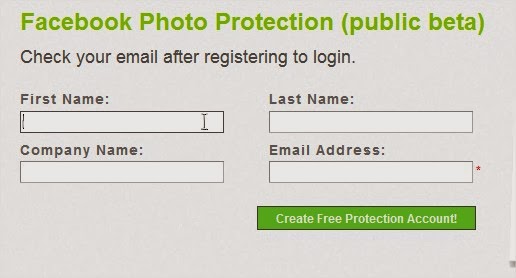
  • After completion of registration Facebook watermark tool from Here or if you are redirected to the watermark page after the registration yourself then its fine.
  • Now Authorize DMCA to get the images from your Facebook profile by clicking on “Get Facebook Albums’
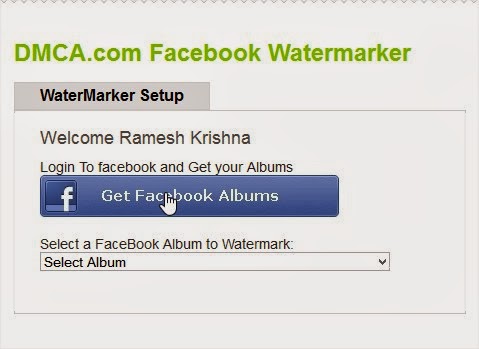
  • After grating the access to get the images, select any album from Dropbox menu.
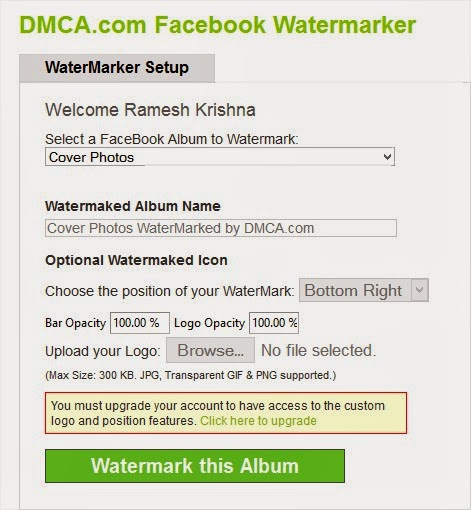
  • Hit on Watermark this Album and you are done. That’s it all your images will be watermarked with DMCA logo.
  • In order to remove the DMCA logo and add your own logo you need to upgrade your plan to monthly to yearly.
  • This was it!

Conclusion

This was all about to protect and secure your Facebook Photos. We are sure that after applying these tips most of your concerns related to this issue have been removed now. Furthermore, if you have any questions left related to this issue then do let us know. We shall get back to your queries as soon as possible. Till then don’t forget to share this guide with your other friends and circle too.

Facebook Security Tips - Scan your FB Profile


The Facebook has become one of the most important aspect of human life now. There are millions of people who uses Facebook daily. However, let me share a unusual fact with you guys, that your Facebook account can be hit through viruses, malware, trojans and other threats which may create various issues and problems with your Facebook account.


So, to make your profile complete secure and protected, we are sharing some Facebook Security tips here. Actually, we are sharing some Facebook apps with you, which will help you to scan your Facebook profile and will help you to remove certain threats from it.

Bitdefender Safego

  • Bitdefender Safego protects your Facebook account from all sorts of e-trouble: scams, spam, malware and private data exposure. Safego also keeps your friends safe.
  • Safego also keeps your online friends safe and …close.
BITDEFENDER SAEGO:

NORTON SafeWeb for Facebook


  • Safeguard against malicious URLs by scanning your feed using Norton Safe Web. Protect your friends by advising them of malicious URLs you might have in your feed.
NORTON SAFEWEB FOR FACEBOOK

SECURE.ME (ANTIVIRUS OF FACEBOOK)


  • Secure.me works like antivirus for social networks and apps. Using sophisticated algorithms, we identify posts and photos that pose a threat to your privacy, security and reputation. In addition to your own Facebook profile, we also monitor your friends network to keep you safe and secure.

Conclusion

These were some Facebook security tips for you guys. You may use any of the above app to remove different viruses, threats and attacks from your FB profile. If you have any kind of question or confusion left related to this issue. Then do let us know. We shall get back to your queries and questions as soon as possible. Till then don’t forget to share this guide with your other friends and circle too. You may never know that your share may be proven helpful and worth reading for many of the users out there. So, keep sharing and liking our content over social media.

How to Track Your Facebook Login Location – Security Tip:


The Facebook security is very crucial for users as they do care different kind of confidential information on their accounts. Additionally, the hackers are very active nowadays in hacking the Facebook accounts. So, it is important for you to keep any eye on your account’s security.

Therefore, today I am sharing an one of the most important practice which will help you to keep an eye on your accounts login locations. Yes, I’ve said login locations. Today you guys are going to learn that, “How to track your Facebook login location?”


This is the latest feature of Facebook in which it gives the complete detail of login location, Operating System and Device type. It can help you to see that where your account is being logged in which will ultimately help you to take initial steps for the security of your Facebook account.


Learn-How to Track Facebook Login Location


So, here are the steps which you need to apply in order to track the Facebook login location. This is the official feature and you’ll not be needed any third party app for making it work for you. Now, without taking your time more I would ask you to get towards the below piece of writing.

  • First of all, login to your Facebook account and then Click on Down arrow.
  • Afterwards, from drop-down menu Click on Settings.
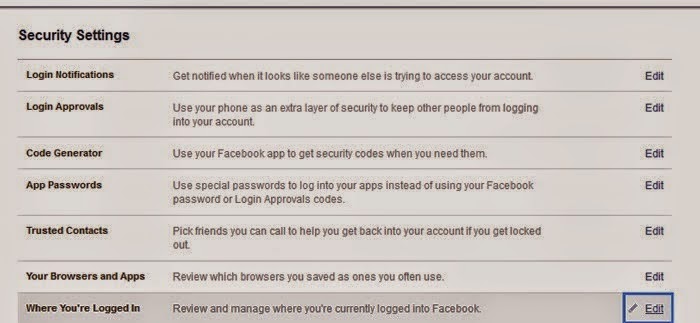
  • Now, Click on Security from left menu and then Click on Edit in front of Where You’re Logged in.

Then you will see all your recent login locations along with Device type. This can help you to check that from where your account is being logged in. This can really help you to take initial step if you have recorded any suspicious login.

Conclusion


This was our guide to track Facebook login location of your Account. I am sure that this article would have been proven helpful for many of the users out there. If you have any kind of question or confusions left related to this article then do let me know. I shall get back to your queries soon. Additionally, if you have found this guide helpful and worth reading then do share it with your other friends and circle too. You may never know that your share may be proven helpful for many of the users out there. So, keep sharing and keep helping your friends.

How to Download Facebook Videos Easily


There are tons of amazing videos that you can find on Facebook. And many of them are so much great and amazing that you want to save or download them in to your computer.


There are many third-party programs and browser extensions that allows you to download the Facebook videos. But the Facebook video downloading programs uses much of your system resources and also takes a lot of time. So, today I have created this tutorial in which I will show you that how you can download Facebook videos easily and quickly without using any third-party programs or browser extensions. There are many Facebook videos downloading websites but most of them doesn’t work. So, without wasting much of your valuable time, let’s get started with our tutorial.

Learn-How To Download Facebook Videos Easily

So, today I had found a website that allows you to download the Facebook videos easily and quickly and it also allows you to download Facebook videos in HD (High Definition) and as well as in SD (Standard Definition) quality. So, follow the below given steps to get started with the tutorial.
  • First of all, open up the Facebook website and login to your account and then go to that video which you want to save or download it to your computer.
  • Now, copy the Facebook link of the video that you want to download. It will be like this: https://www.facebook.com/video/video.php?v=10150148791745639
  • After that,open up the SaveVideo.me website in your browser.
  • Now, paste the Facebook video link in the green URL box.
  • Then, click on Download button.
  • Now, wait for few seconds and then you will see two options for downloading the video, one is in the HD format and the other in SD format.
  • After that, right-click on your desired video quality and then click on Save Link As…button.
  • Then, just click on Save button to download the Facebook video to your computer.
  • That’s it! You are done! Now, you have successfully downloaded a Facebook video to your computer.

Conclusion

So, this was all about how to download Facebook videos easily and quickly. I hope that now you will be able to quickly and easily download Facebook videos without installing any third-party programs or extensions in your browser. If you have any type of queries regarding this tutorial then do let us know, we will try our best to resolve them. And plus, if you’d like this tutorial then don’t forget to share this with your friends and social circles too.